


Key Takeaways
- Regex lets you filter a 40,000-row Search Console export by pattern instead of by exact keyword, so you can pull every pricing query, comparison query, or question in a single pass rather than a dozen manual searches.
- The practical payoff: filter to buying-intent queries, then look only at pages ranking between positions 5 and 20. Google already considers those pages relevant, so they usually need one section rewritten rather than a new article.
- Branded keywords distort every organic report. One pattern for your brand name and its misspellings, set to “doesn't match," gives you non-branded performance as a clean trend line.
- The most expensive mistake is a pattern that's too loose. Without word boundaries, “vs" also matches “vsphere” and “vsan,” and you end up building a strategy on a segment three times bigger than it should be. Always sanity-check the row count.
- AI writes the syntax reliably now. What still requires you: choosing which segment is worth isolating, and staying skeptical about intent labels, since “best" often means someone is still researching rather than ready to buy.
Regex (short for regular expressions) finds, filters, and groups data based on patterns instead of exact words. For SEO, that means pulling every question keyword, competitor comparison, or pricing query out of a dataset in one move. Search Console alone can hand you tens of thousands of queries, and filtering them one word at a time is data entry, not analysis. Instead of running four separate filters for “best,” “vs,” “reviews,” and “alternatives,” one pattern can catch all four at once.
This piece walks through the regex patterns and workflows SEOs actually use inside Google Search Console, Screaming Frog, GA4, and exported keyword sets. No programming background required. AI can write most of your regex for SEO now, so the skill that still pays isn't syntax, it's knowing which segments are worth isolating and what to do with the data once you have it.
What Is Regex and Why Regex for SEO Matters
Most SEO tools hand you a search box that matches text literally. Regex replaces that with a small set of symbols that describe a shape of text, and that difference starts paying off the moment your dataset grows past a few hundred rows.
How Pattern Matching Actually Works
An exact-match filter asks one question: “Does this row contain these exact characters?” A regex filter asks something far more useful: “Does this row fit this description?” The description can be loose (contains any of these six words) or tight (starts with “how” and ends in a question mark).
Say you want every query signaling pricing intent. Exact match forces three separate passes for “price,” “pricing,” and “cost.” The pattern pric(e|ing)|cost pulls all three in a single filter, and every row keeps its impressions, clicks, and average position attached to the query. That intact context is what turns a filter into an actual analysis.
The Regex Syntax SEOs Actually Need
You can safely ignore most of the regex documentation. These few pieces cover almost every SEO filter you will ever need to build:
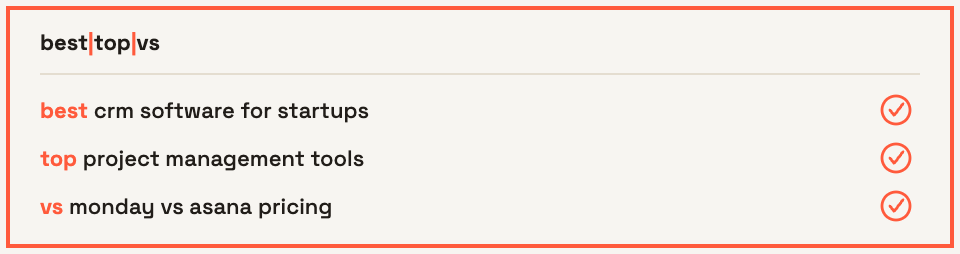
- The pipe
|means OR:best|top|vsmatches any query containing at least one of those words:
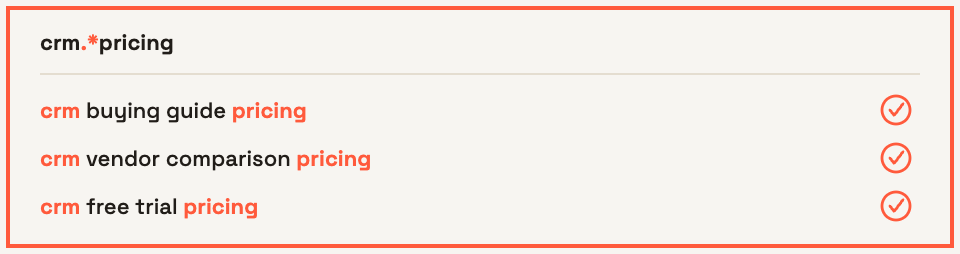
- The
.*combination stands in for any characters: useful when you want two terms present in the same query regardless of what sits between them:
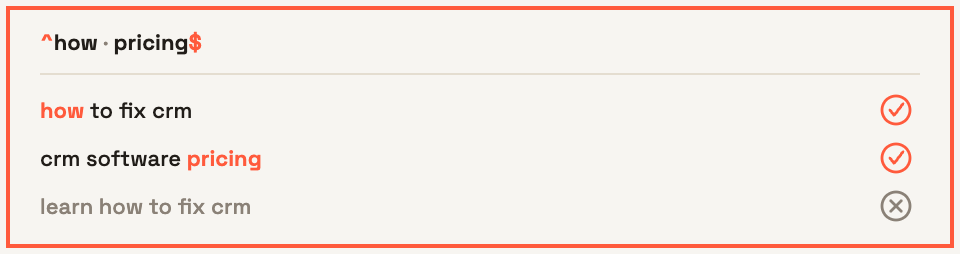
- The anchors
^and$lock the start and end of a string: this is how you catch queries that begin with “how” rather than ones that merely include it somewhere:
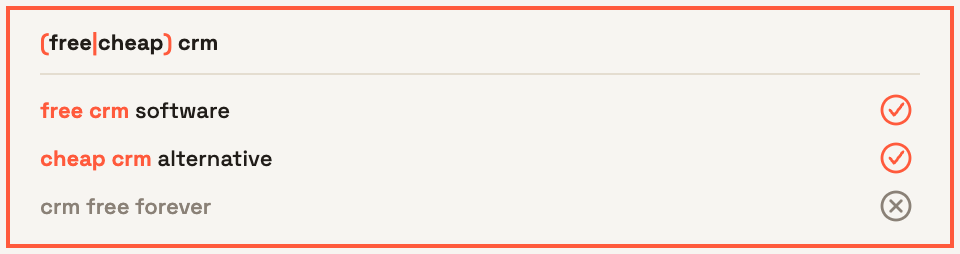
- Brackets
()group terms together: the OR then applies only inside the group, as in(free|cheap) crm:
- Square brackets
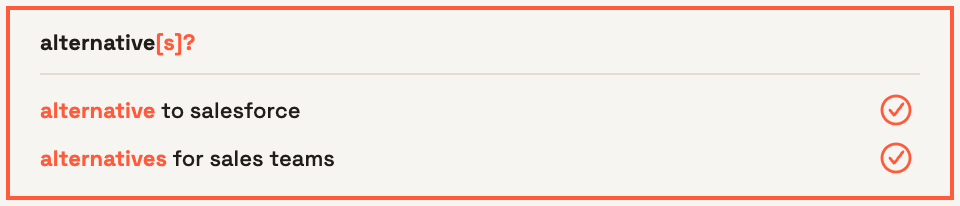
[]define a character set, and?,+,*handle optional or repeated characters: together they let you cover singular and plural forms in one pattern instead of two:
- The
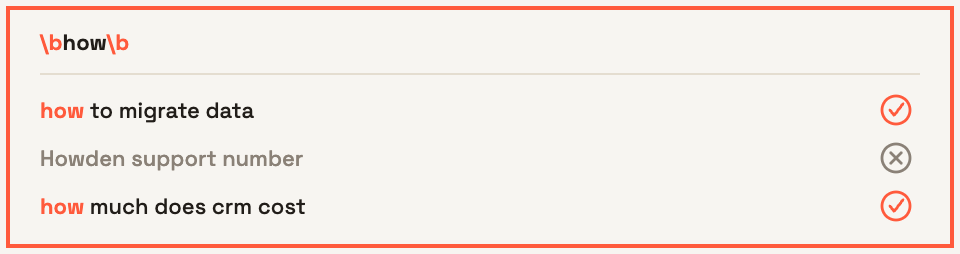
\banchor marks a word boundary: without it, “how" matches inside “Howden" and “what" matches inside “whatsapp," so a pattern that should isolate a few hundred queries can quietly balloon into a few thousand:
Learn those six behaviors, and you can read or write roughly any pattern another SEO shares with you.
Where You Can Use Regex for SEO
Google Search Console accepts regex in both the query and page filters. Screaming Frog uses it for include, exclude, and custom extraction rules. GA4 supports it inside explorations and audience conditions. Ahrefs, Semrush, and any keyword export you drop into Google Sheets or Excel all handle it too, which means one pattern often travels across your whole reporting stack.
One thing to watch for before you start copying patterns between platforms: implementations differ. Google Search Console and Google Sheets both run on RE2, which does not support lookaheads, while Screaming Frog's Java-based regex engine does. A pattern that works perfectly in one tool can silently return nothing in another, so test every pattern in the environment where you plan to use it.
Regex Patterns Every SEO Should Know
Six pattern families cover most of the filtering work an SEO does in a given week. Before you copy any of them, test each one in Search Console specifically rather than assuming it behaves the way it did in Screaming Frog or a spreadsheet, since that's the platform most likely to reject something the others accept.
Find Question and Informational Queries
Two versions of this pattern do different jobs. If you want queries that begin with a question word, anchor it: ^(how|what|why|when|where|which|who|can|do|does|is|are|should)\b. If you want questions buried anywhere in the string, drop the caret and keep the word boundaries: \b(how|what|why|when|where)\b.
That \b matters more than most people expect. Without it, “what” pulls in “whatsapp integration” and “how” grabs brand names like “Howden.” One sloppy boundary can inflate a segment by a few hundred queries and send you off writing content nobody actually searched for.
What you get back from this filter is a map of the questions your audience already asks Google while your pages sit on page two. Those questions become FAQ sections, glossary entries, and supporting articles with proven demand already attached to them, which is a far safer bet than guessing at topics from scratch. Pair the output with a structured keyword research checklist and you have a content plan built on observed behavior rather than assumption.
Find Commercial and Comparison Keywords
This is the segment most B2B SaaS teams underweight. Try: \b(best|top|vs|versus|alternatives?|reviews?|comparisons?|competitors?|which)\b.
Note the ? after “alternatives” and “reviews.” It makes the preceding character optional, so a single pattern catches both singular and plural forms without doubling the length of your list. The word boundary is non-negotiable in infrastructure and cloud niches: without it, “vs” matches “vsphere,” “vsan,” and “vsx,” and your comparison segment fills up with product queries that carry no comparison intent whatsoever.
Find Transactional and Bottom-Funnel Keywords
Buying-intent language is narrow and predictable, which makes it easy to isolate: \b(pricing|price|cost|costs?|how much|demo|free trial|trial|buy|quote|hire|vendors?|providers?)\b.
On its own, this list is just a keyword group. It earns its keep when you layer it over performance data. Filter Search Console to the pattern, sort by impressions, then look hard at anything sitting between positions 5 and 20. Google already considers those pages relevant enough to show, and the query already signals purchase intent. A tightened title tag, a real pricing table, or a comparison block often moves them up without a single new backlink.
Separate Branded, Non-Branded, and Competitor Queries
Branded traffic distorts every organic report it touches. Build one pattern for your name plus its common misspellings and spacing errors, for example brandname|brand name|brandnames|brandnaem, then use Search Console's “Custom (regex)” filter set to “doesn't match” to see non-branded performance on its own. Run the same pattern with “matches” to track branded demand as a separate trend line, since the two move for completely different reasons.
Competitor queries work the same way, with one twist. To catch queries that pair a competitor with buying intent, order matters, because (competitor).*(alternative|vs|pricing) misses “alternative to competitor.” Cover both directions: (competitor).*(alternative|vs|pricing)|(alternative|vs|pricing).*(competitor). Feed what you find into a proper competitor keyword gap analysis so the patterns turn into a prioritized list of pages to build.
Find Long-Tail and Conversational Searches
Word count is a filter almost nobody thinks to use. This pattern returns queries with seven words or more: ^(\w+\s){6,}\w+$. Change the number to move the threshold up or down.
Longer strings carry more context, and that context is exactly what makes them valuable. Two types worth pulling out first when you run regex for SEO segmentation:
- Full-sentence queries: phrasings like “how do I migrate from x to y without downtime” tell you the specific constraint the searcher cares about, which is usually the angle your competitors skipped entirely.
- Qualifier queries: strings containing “for,” “without,” “with,” or “instead of” reveal use cases, integrations, and objections you can answer directly on pages that already exist.
Search behavior is getting wordier as people type prompts instead of keywords. Be careful, though, about labeling every long query as an AI-driven search. Search Console does not tell you which interface a query came from, and treating an assumption as data is how expensive strategy mistakes begin.
How to Use Regex to Analyze SEO Performance
Filtering is the easy part. The payoff comes when you attach those segments to clicks, impressions, positions, and revenue, because that's the moment a query list turns into a decision about what to build next.
Segment Organic Search by Funnel Stage
“Organic traffic grew 14% last quarter” tells a marketing leader almost nothing. Traffic from what kind of buyer? Split your queries into three groups instead: top-funnel (what, how, guide, examples, template), middle-funnel (best, reviews, comparison, alternatives), and bottom-funnel (pricing, demo, buy, hire). Run each pattern in Search Console across the same date range, note the clicks and impressions, then repeat for the previous period.
The shape of that data usually surprises people. Plenty of B2B SaaS sites discover their growth sits entirely in top-funnel queries while comparison and pricing demand stays flat, which explains why organic sessions climb and pipeline doesn't move. You can wire these same segments into Data Studio as saved regex filters so the split refreshes on its own each month, and the same logic carries over to whichever digital marketing reporting tools your team already lives in.
Find Striking-Distance Content Opportunities
Striking distance means queries where Google already ranks you close to the top but not close enough to earn clicks. Combining an intent pattern with position and impression thresholds isolates them fast, turning regex for SEO into something that shapes your content calendar directly:
- Open Search Console performance data, set the date range to the last three months, and enable the Average Position and CTR columns.
- Apply your commercial or transactional pattern to the query filter so you're only looking at buyer-intent searches.
- Export to Google Sheets, then filter for average position between 5 and 20 and impressions above a floor that makes sense for your market (500 a month works for most mid-size SaaS sites).
- Sort by impressions descending and flag any row where CTR sits well below what that position normally earns.
- Open the ranking URL for each flagged query and check whether the page genuinely answers it, or whether Google settled for your closest match.
Work through 20 rows this way and you'll typically find a handful of pages that need one section rewritten rather than a brand-new article, which is the cheapest ranking improvement available to most teams. Feed the leftover gaps straight into your B2B keyword research queue so nothing gets researched twice.
Analyze Content Clusters and Spot Cannibalization
Switch the filter from queries to pages and you can group URLs by directory: /blog/, /solutions/, /product/, or a topic slug like disaster-recovery. Compare clicks, average position, and conversions across those clusters and the weak spots become obvious, usually a directory absorbing plenty of impressions while converting almost nobody.
The same view catches structural problems. Filter to one query group, look at the Pages tab, and watch for two or three URLs competing for the same terms. Parameter strings, an abandoned /resources/ directory, and pages surviving from a pre-migration URL structure all show up here, and each one is a fix you can ship without writing anything new.
Advanced Regex Workflows and Where They Break Down
A single filter answers a single question. Repeating that filter every month without rebuilding it from scratch turns regex for SEO into an actual habit, and it's also where most teams run into trouble, either because a pattern misfires without anyone noticing, or because the segments get built, screenshotted, and then forgotten.
Regex Workflows in Google Search Console and Screaming Frog
In Search Console, the real gain comes from stacking filters instead of running them one at a time. Apply a commercial-intent pattern to the query field, switch the page filter to a regex covering /blog/|/resources/, then set the date comparison to the last 3 months against the previous period. You are now looking at one clear question: is our informational content pulling in buyer-intent traffic, and is that number moving up? That is something you can act on this quarter. A raw clicks chart gives you nothing to decide.
Crawlers flip the order of operations, because you apply the pattern before the data exists. Exclude rules such as .*\?.* keep parameter URLs out of a crawl entirely. Include rules narrow a crawl to one template, so you can audit 400 product pages instead of waiting on 40,000 URLs you never intended to review. Custom extraction pulls a repeated element (schema type, author byline, publish date) from every page matching your pattern, which is the fastest way to check template consistency across a large site.
Let AI Write the Regex, Then Check It for Common Mistakes
Writing patterns by hand stopped being the bottleneck a while ago. A prompt like “Write a Search Console compatible regex, RE2 syntax, matching queries containing best, top, vs, versus, alternative, alternatives, review, or comparison, with word boundaries” returns a working expression in seconds. Name the tool you are pasting into, describe what should not match, and include ten real queries from your own account so you can test the output immediately.
Turning Regex Segments Into Organic Growth
Isolating 300 comparison queries takes about four minutes. Deciding which 15 justify a dedicated page, assigning who writes them, and connecting them back to the pipeline is where most in-house teams stall out.
Regex Output vs. What It Takes to Act on It
Isolating the data and acting on it are two different jobs:
Closing that gap is exactly what Entlify's B2B digital marketing work is built for. Entlify Radar handles the analysis layer (keyword gap work, competitive tracking, technical audits), Entlify Core turns those findings into SEO, paid search, CRO, and content programs, and Entlify Studio ships the pages so nothing sits waiting in a backlog for two quarters. If your query data already shows you where the demand is, get in touch with our team about turning it into a pipeline.
Regex Is a Tool for Asking Better SEO Questions
No one has ever won an SEO argument with a clever pattern. The win comes from the question sitting underneath it: which buyers can't find you, which stage of the journey is thin, which pages are sitting just outside the click zone. Regex for SEO simply makes those questions answerable in a few minutes rather than an afternoon of dragging rows around a spreadsheet. Let AI handle the syntax. What's left for you is judgment, knowing which slice of the data actually deserves your attention and staying honest about how rough your categories really are.
Take the buying-intent pattern, run it against your last three months of Search Console data, and count how many of those queries sit between positions 5 and 20. That one view tends to surface more work worth doing than a full site audit ever does. Then build the habit around it: one saved filter, one clear question, one decision about what gets published or fixed next.
FAQs
Do I need programming knowledge to use regex for SEO?
No. You need to recognize about six symbols and be able to sanity-check a pattern's output, since AI tools can now generate the syntax for you in seconds.
Which SEO tools support regex filtering?
Google Search Console, Screaming Frog, GA4, Data Studio, Ahrefs, Semrush, and any keyword export opened in Sheets or Excel all accept regex. Just remember that Search Console and Sheets both run on RE2, so patterns relying on lookaheads will fail in either one, Screaming Frog's Java-based engine is the exception that supports them.
How do I separate brand and non-brand queries with regex?
Build one pattern covering your brand name plus its misspellings and spacing variants, then apply it twice in Search Console: once set to "doesn't match" for non-branded performance, once set to "matches" to track branded demand separately.
Can regex speed up technical SEO audits?
Yes. Include and exclude rules in a crawler let you restrict a crawl to a single page template or strip out parameter URLs before crawling starts, and custom extraction pulls the same element from every matching page so template inconsistencies surface quickly.
What is the most common mistake when writing regex for SEO?
Leaving out word boundaries, which causes short terms to match inside longer unrelated words and inflates a segment with queries that carry none of the intent you were targeting. Always compare the row count against what you expected before acting on the data.