



Key Takeaways
WebMCP is a proposed browser-level standard backed by Google and Microsoft that lets websites declare their functionality as structured, callable tools, so AI agents can discover and execute actions directly, rather than scraping HTML and guessing at page elements. Sites that implement WebMCP early will gain a competitive edge as agentic traffic grows, since agents will favor websites where they can reliably complete tasks over those that force them through fragile, multi-step click chains.
AI agents are already browsing the web on behalf of users. Google's Chrome Auto Browse, OpenAI's Atlas, and similar tools fill forms, run searches, and complete checkouts. The catch: they do it by scraping raw HTML and guessing which buttons to click. It's slow, token-expensive, and breaks constantly. WebMCP (Web Model Context Protocol) gives websites a way to declare their capabilities as structured, callable tools that agents can discover and use directly. No guessing required.
This article covers how WebMCP's two APIs work and what the protocol means for SEO and digital marketing strategy. If you manage a B2B site's technical performance or organic visibility, this is the clearest breakdown available on preparing before the standard fully ships in Chrome and Edge. The sites that adapt early will have a real edge when agents start picking favorites.
The Problem with How AI Agents Use Websites Today
Before we get into what WebMCP fixes, it helps to understand what's actually broken. The way AI agents interact with websites right now is, frankly, a mess. And that mess has real consequences for the sites being left behind.
What Browser Agents Actually Do Right Now
When an AI agent lands on a webpage, it doesn't “see" the page the way you do. It pulls the raw HTML, parses the DOM (Document Object Model) tree, and tries to figure out which elements are clickable, which fields need input, and what order things should happen in. Some agents take screenshots and use vision models to interpret what's on screen. Others rely entirely on the underlying code structure. Either way, the agent is guessing.
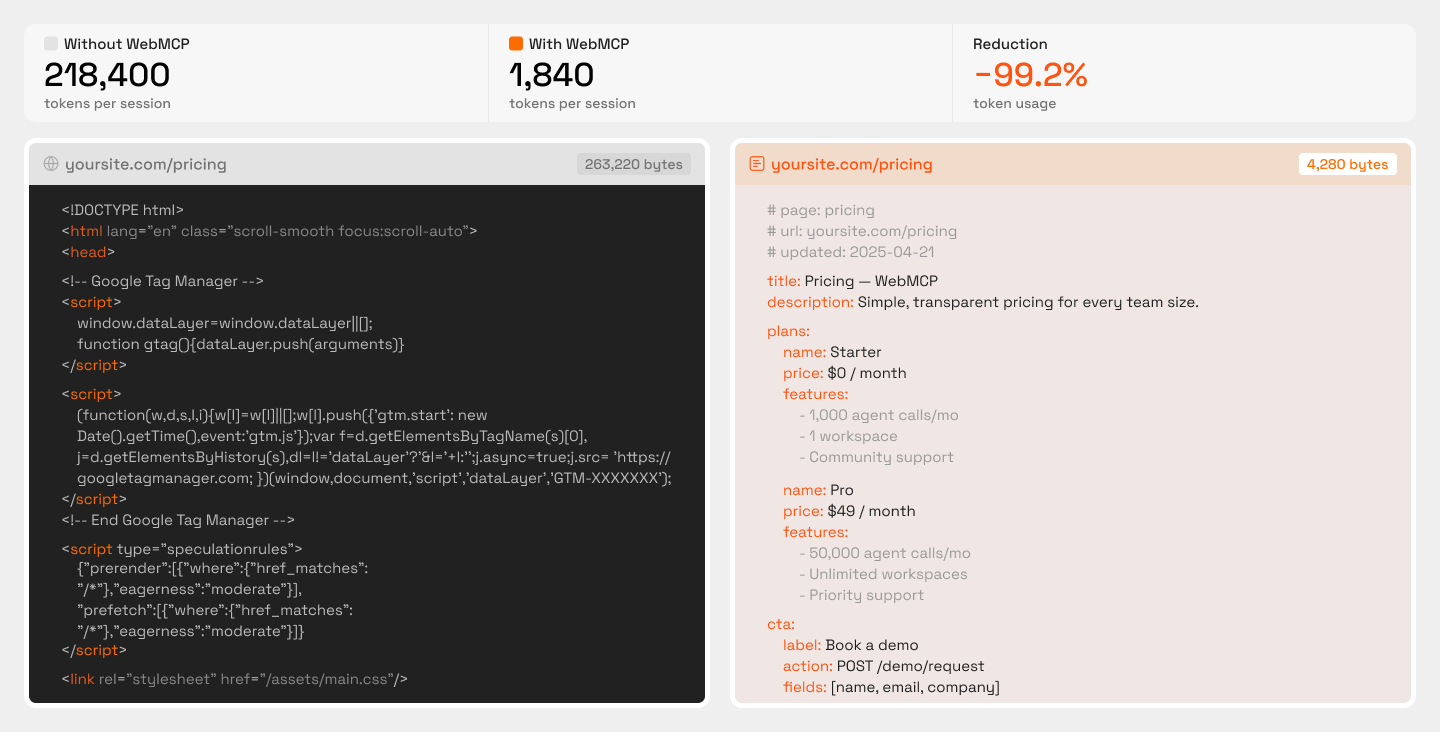
Think about something as common as submitting a demo request. A human sees a “Book a Demo" button, clicks it, fills in their company details, and hits submit. An agent doing the same thing has to identify the correct button element among dozens of similar-looking ones, trigger the right JavaScript event, wait for the form to load (often through a dynamically rendered component), then locate and map each field correctly, all while burning tokens on every step. One minor redesign, a class name change, a shifted element, and the whole chain breaks.
As a DEV Community breakdown put it, most of the web renders content with JavaScript, hides data behind interactive elements like filters and dropdowns, and was fundamentally “designed to be used, not scraped." The result: agents that are slow, expensive to run, and unreliable across sessions.
Why This Matters for Websites
If an AI agent tries to complete a task on your site and fails, it doesn't retry five times and send you an error report. It moves on to a competitor whose site it can actually use. That's a lost booking, a lost signup, a lost sale, and you never even knew the “visitor" showed up.
This isn't hypothetical. Google's Chrome Auto Browse, OpenAI's Atlas, and Perplexity's Comet are all shipping or actively testing agent-based browsing. These tools represent a growing category of traffic where the “user" is an AI completing tasks on someone's behalf. If your site can't participate in that workflow, you're invisible to an entire channel, and that's a problem that compounds as AI continues to reshape how search and discovery work. WebMCP exists to solve exactly this problem, giving websites a structured way to communicate their capabilities directly to agents instead of hoping the agent figures it out on its own.
The shift here is worth paying attention to. Traditional SEO focuses on making your content discoverable to search crawlers. Agent compatibility is about making your site usable by AI systems that are trying to act, not just read. If you're already thinking about how to stay visible in ChatGPT and similar AI search tools, agent readiness is the next logical step.
What WebMCP Is
We've established the problem: AI agents are going through websites like tourists without a map. Now let's talk about the fix. WebMCP isn't a band-aid or a workaround. It's a proposed browser-level standard designed to make the web agent-friendly from the ground up.
WebMCP Defined: What It Is and Who's Behind It
WebMCP stands for Web Model Context Protocol. It's a proposed web standard that allows websites to declare their capabilities as structured, callable tools that AI agents can discover and execute directly. Instead of an agent reverse-engineering your checkout flow from raw HTML, your site tells the agent: “Here's a tool called ‘book-flight.’ It needs a departure city, an arrival city, and a date. Call it, and I'll return results."
The backing here matters. This isn't a side project from a random startup. WebMCP is a joint effort from Google's Chrome team and Microsoft's Edge team, currently being incubated through the W3C. According to the Chrome for Developers blog, WebMCP is already available for prototyping through an early preview program, with broader Chrome and Edge support expected by mid-to-late 2026.
If you're already familiar with MCP (Model Context Protocol), the open standard Anthropic introduced for connecting LLMs to external tools and data, WebMCP builds on that foundation. The key difference is that MCP typically requires a separate server to expose tools. WebMCP brings that capability natively into the browser, so the website itself becomes the tool surface. No middleware, no extra infrastructure.
The Core Shift WebMCP Introduces
The simplest way to grasp WebMCP is this: it turns a website into a structured API that AI agents can call, without the site needing to build or maintain a separate API. Your existing pages, forms, and interactive elements become the interface.
The before-and-after contrast tells the story clearly. Here's how AI agent interactions with websites change once WebMCP enters the picture:
The concept driving all of this is tool discovery. An agent visits a page and immediately sees what tools are available, what each tool does, and what inputs it requires. It picks the relevant one and executes it. No scrolling, no screenshot analysis, no fragile click chains. Think of it like the difference between handing someone a restaurant menu versus making them walk into the kitchen and figure out what ingredients are available. WebMCP gives agents the menu. And for teams already working on AI search visibility, understanding how agents discover and interact with your site is becoming just as important as how humans do.
How WebMCP Works: The Two APIs
So we know what WebMCP is and why it exists. Now let's get into how it actually works. The protocol gives developers two distinct APIs to choose from: one that's lightweight and perfect for existing sites, and another built for complex, state-dependent interactions. The right choice depends on what your site does and how much control you need over the agent experience.
The Declarative API: The Low-Lift Option for Existing Sites
If your site already has well-structured HTML forms, you're much closer to WebMCP readiness than you might expect. The Declarative API works by adding attributes directly to your existing form elements, specifically toolname and tooldescription. That's the entire implementation. No backend changes, no new endpoints, no infrastructure overhaul.
Think about a standard contact form. Right now, an AI agent visiting your page has to parse the DOM, guess which fields map to “name," “email," and “message," then figure out how to submit everything correctly. With the Declarative API, you add two attributes to that form tag, and the agent instantly knows: “This is a tool called ‘send-inquiry.' It accepts a name, email, and message. I can call it." The same logic applies to search fields, booking forms, newsletter signups, and any other standard HTML form. Sites built on clean, semantic HTML are essentially a couple of attributes away from full participation.
This is especially relevant for teams already investing in generative engine optimization, because making your site agent-readable is a natural extension of making it AI-discoverable.
The Imperative API For Dynamic and Complex Interactions
Not every interaction fits neatly into a static form. Some tools only make sense in a specific context: after a selection has been made, a page has been reached, or a condition has been met. The Imperative API is designed for exactly these cases.
Developers register tools programmatically using navigator.modelContext in JavaScript. Each tool gets a name, description, input schema, and an execute function. The real advantage here is that tools can be registered and unregistered based on page state. A “request-proposal” tool only surfaces after a pricing tier has been selected. A “schedule-demo” tool only appears once the agent has navigated to a specific product or service page. The agent never sees irrelevant options, which dramatically reduces confusion and failed execution attempts.
Here's a quick comparison of the two API approaches, what each one is best suited for, and when to prioritize implementation:
The Three-Step Agent Workflow
Regardless of which API a site uses, the agent follows the same straightforward process. Here's how the Discover → Schema → Execute flow breaks down in practice:
- Discover: The agent visits the page and reads all declared WebMCP tools, their names, and what each one does. No DOM guessing, no screenshot interpretation. Think of it like reading a table of contents before opening the book.
- Schema: For the relevant tool, the agent retrieves the input schema, which parameters are required, what types they expect, and any constraints. This is similar to how MCP handles tool discovery and invocation in server-based setups, but here it happens natively in the browser.
- Execute: The agent calls the tool with the correct inputs and receives structured output. One call. Done. Compare that to the old approach: clicking filters, scrolling, waiting for dynamic content to render, screenshotting, with each step burning tokens and adding latency.
This three-step pattern replaces a fragile, multi-step chain with a single, predictable interaction. For sites that implement WebMCP, the payoff is clear: agents complete tasks faster, more reliably, and with far less computational overhead.
What WebMCP Means for SEO and Digital Marketing
Traditional SEO has always centered on discoverability, getting your pages to rank so humans click through. WebMCP introduces a second dimension: agent-usability. An AI agent might find your site through search results, but if it can't execute a task there (submit a form, complete a booking, run a product search), it moves on to a competitor that exposes those actions as callable tools.
This makes WebMCP readiness a direct extension of technical SEO. Sites that expose structured tools will be preferred by agents over those requiring DOM parsing, the same way mobile-friendly sites gained ranking preference after Google's mobile-first indexing shift.
For developers on your team, the WebMCP GitHub repository is where spec changes happen in the open. For everyone else, the Chrome for Developers blog is the easier place to stay informed. It's a light commitment that keeps you from being caught off guard when breaking changes land.
The Agentic Traffic Opportunity
A new traffic category is taking shape: agentic traffic. These are visits and task completions initiated by AI agents acting on behalf of users, not by the users themselves. As Department of Product's Knowledge Series covered in their WebMCP breakdown for product teams, this protocol could fundamentally reshape how AI agents interact with your product, and by extension, how traffic arrives at and converts on your site.
Not every site type will feel the impact equally, at least not at first. Here's a look at which sites are best positioned to capture early agentic traffic gains and why:
The parallel to mobile optimization between 2012 and 2015 is hard to ignore. Early movers captured a structural advantage that late adopters spent years trying to close. WebMCP adoption follows a similar arc.
What WebMCP Readiness Actually Looks Like
The sites closest to WebMCP-ready tend to share the same foundation: semantic HTML, explicitly labeled form fields, and interactive elements that don't rely entirely on custom JavaScript to function. Demo requests, signup flows, search bars, pricing calculators: these are the tools agents will want to call first. Open each one and ask: does this form use semantic HTML? Are labels explicit? Would a machine reading the markup understand what each field expects without seeing the visual layout?
Sites that already meet WCAG accessibility standards tend to perform well here because both WCAG and WebMCP depend on the same foundation: clear, machine-interpretable structure. Sites built on custom JavaScript components with no semantic fallbacks will need structural work before WebMCP attributes have anything clean to attach to.
Conclusion
WebMCP is on track to become a browser-level standard, and the window to build internal knowledge before it ships broadly is open. Teams that audit their forms, test the Declarative API through Chrome's early preview program, and assign someone to track the W3C spec will have a meaningful head start over those who wait for a final release announcement.
That's exactly the kind of cross-functional work Entlify's B2B Digital Marketing service is built around: aligning SEO, CRO, paid search, and web development so nothing falls through the cracks. If you want help connecting those dots, get in touch with our team.
FAQs
Why do AI agents have to pretend to be humans when browsing websites?
Because websites were built for human interaction, not machine consumption, agents are forced to reverse-engineer page layouts, guess at button functions, and simulate clicks through raw HTML parsing. WebMCP changes this by letting sites expose their functionality as structured tools that agents can call directly without pretending to be a person clicking through a UI.
What actually happens when an AI agent calls a WebMCP tool on a website?
The agent sends the required parameters (like a search query or form inputs) to the declared tool function, and the site returns structured output in a single exchange. There is no multi-step clicking, no waiting for page renders, and no screenshot interpretation involved.
Do I need to build a separate API for my website to support AI agents?
No. The Declarative API lets you add simple attributes to your existing HTML forms, turning them into agent-callable tools without any backend changes or new infrastructure.
Will WebMCP replace schema markup and structured data for SEO?
It is not a replacement. Schema markup helps search engines understand what your content is about, while WebMCP helps AI agents understand what your site can do and how to interact with it. The two work as complementary layers.
How can I tell if my site is ready for AI agent interactions?
Start by checking whether your forms use clean semantic HTML with properly labeled fields and a clear page hierarchy. You can also install the WebMCP Model Context Tool Inspector from the Chrome Web Store to audit how your pages would look to an agent scanning for declared tools.